Overview
Identifying whether you have a TytoCare G1 or G2 device is important for determining charging port types and software compatibility.
Method 1: Check the Device Menu
You can find the hardware information directly on the device screen:
- Power on your Tyto device.
- Open the Device Menu.
- Tap About.
- Look at the HW Version:
- If it begins with "TY-G2...", you have a G2 device.
- If it begins with "TYTO...", you have a G1 device.
Method 2: Check the Device Sticker
If the device is powered off, you can identify the model by the sticker located on the bottom of the unit, above the charging port:
- G2 Device: The sticker will explicitly state "Tyto Device G2".
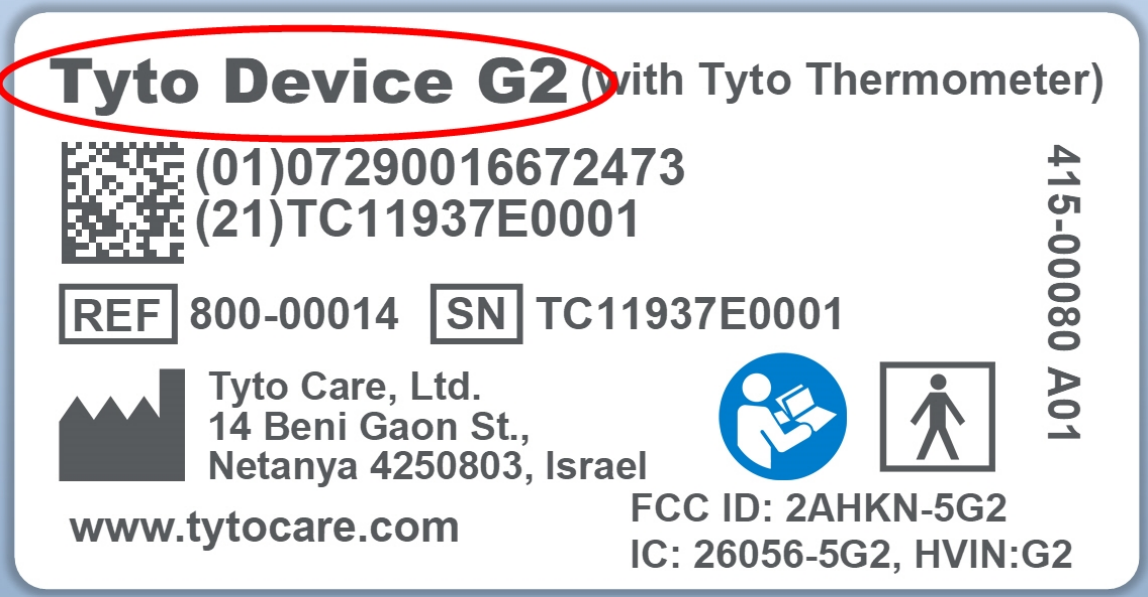
- G1 Device: Any other sticker variation indicates a G1 model.
Visual Differences and Charging
Beyond the menu and stickers, you can identify the version by the charging port and indicators:
- G1 Devices: Feature a specific charging outlet near the headphone jack. The light is Orange when charging and Green when charged.
- G2 Devices: Utilize a USB-C port at the bottom of the device. The light is Purple when charging and Blue when charged.